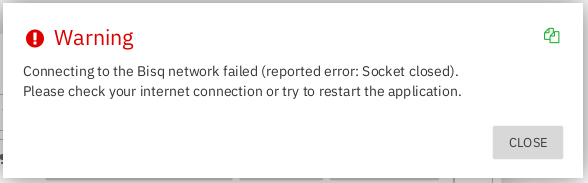
Hello all, Bisq stalls at ‘connecting to Tor network’ & then throws the following popup:
All suggestions published in the preceding dialog box have been attempted & failed, Tor browser starts & connects without issue, & if the above dialog box is closed [allowing Bisq to continue its startup] the application will eventually fail with the following popup:
There are no issues with my Internet connection & many application restarts have been performed.
The following Errors & Warnings were reported by the log [Startup @ Jul-25 16:24:20.421]:
(1) Jul-25 16:28:39.141 [JavaFX Application Thread] WARN b.c.a.BisqSetup: startupTimeout called
(2) Jul-25 16:45:02.720 [StartTor] ERROR b.n.p.n.TorNetworkNode: Could not connect to running Tor java.net.SocketException: Socket closed
(3) Jul-25 16:45:02.724 [JavaFX Application Thread] ERROR b.c.a.P2PNetworkSetup: onSetupFailed
(4) WARN b.c.p.PersistenceManager: Application has not completed start up yet so we do not flush data to disk.
Bisq is installed on Debian Trixie & was running normally prior to the upgrade.
I would greatly appreciate anyone’s ideas on how to troubleshoot this issue & thank you in advance.
Thanks for your time in response to my query…
I have successfully recovered a broken installation once before by reference to ‘ Last resort restore - Bisq Wiki ’. However, this time the application would not start even from a fresh data directory. Approximately 4 min. into startup the app logged:
- [JavaFX Application Thread] WARN b.c.a.BisqSetup: startupTimeout called
Approx. 16 min later the following 2 entries were logged:
- [StartTor] ERROR b.n.p.n.TorNetworkNode: Could not connect to running Tor java.net.SocketException: Socket closed
- [JavaFX Application Thread] ERROR b.c.a.P2PNetworkSetup: onSetupFailed
I do not believe that Tor is the issue - it appears that Java may be the culprit here? What are your thoughts?
I await your response & again - thank you in advance for your time.
What OS are you running on? If it’s windows, I would try my luck in a debian VM.
In the meantime, I will forward this error to devs.
1 Like
By the way, even if you are not seeing memory errors, it still pays to increase the ram available to bisq by editing Bisq.cfg in the application folder (not the data directory), and adding:
java-options=-XX:MaxRAM=8g
java-options=-Xmx8g
1 Like
Debian 13 (Trixie) & Thank you for the forward…
I reinstalled & then uninstalled in steps from v.1.10.2, then 1.10.3, & finally ending up @ v1.10.4. Bisq started successfully on all 3 occasions. After completing the ‘Last Resort Restore’ procedure I’m back in business [thank you] but the log still has some curious entries such as:
[JavaFX Application Thread] WARN b.c.d.g.b.BlindVoteValidator: blindVoteTx must have type BLIND_VOTE but is IRREGULAR.
That warning occupies nearly 600 consecutive lines repeating the following 3 different ‘TxId’s’.
(1) blindVoteTxId=e864340580bb9329ad78cf7dc91fb16caa7fa5ca042517342adb17694ca3b681
(2) blindVoteTxId=a8356d2a7ce85b05d97935b122fea2c0102559712bea7324411980cc7d5e3753
(3) blindVoteTxId=823b66eb36042e57df90bc8511ec86715589cf74443530fa87c2453797185812
After receiving a ‘Java Heap Space’ error I’d increased ram to 12Gb.
With fingers crossed I’m remaining hopeful…
so except the flood about blind vote txs everything is fine now?
I guess those errors are related to some incompletely synced DAO state and I do not expect those to interfere with your trading, but keep me posted
1 Like
Everything’s back to normal & you are correct in that the ‘blind vote’ flood [which has not repeated today] has not impacted my trading - so for now I’ll consider the issue remedied & your assistance was/is greatly appreciated. I will keep you apprised but as they say ‘no news is good news’.
Talk to you later…
1 Like