I am trying to upgrade to Bisq v1.10.0 but I’m running into trouble, would appreciate help.
I downloaded the Red Hat/Fedora rpm, and the Red Hat/Fedora PGP asc signature, and the PGP Public Key from Bisq Downloads ‹ Bisq - A decentralized bitcoin exchange network .
I tried to download the PGP Signatures, but this was just a link to GitHub so I ignored that.
First, I imported the public key file I just downloaded:
[workstation user ~/.tb/tor-browser/Browser/Downloads]% gpg --import E222AA02.asc
gpg: key 0xF806F422E222AA02: public key “Alejandro García alejandro.garcia@disroot.org” imported
gpg: Total number processed: 1
gpg:               imported: 1
[workstation user ~/.tb/tor-browser/Browser/Downloads]%
Next, I tried to verify the download:
[workstation user ~/.tb/tor-browser/Browser/Downloads]% gpg --verify Bisq-64bit-1.10.0.rpm.asc Bisq-64bit-1.10.0.rpm
gpg: Signature made Sat 16 May 2026 01:04:03 AM UTC
gpg:                using RSA key B8A5D214ADFAA387A14C8BCF02AA2BAE387C8307
gpg:                issuer "boilingfrog@gmx.com"
gpg: Can't check signature: No public key
zsh: exit 2     gpg --verify Bisq-64bit-1.10.0.rpm.asc Bisq-64bit-1.10.0.rpm
[workstation user ~/.tb/tor-browser/Browser/Downloads]%
I get an error when I do this. Am I doing it wrong? I downloaded all three files directly from the bisq.network/downloads page multiple times and got the same SHA, so I don’t think that’s the problem. I’m downloading the verification key and the release and the .asc file all right from the website. Here is a screenshot of the three files I downloaded:
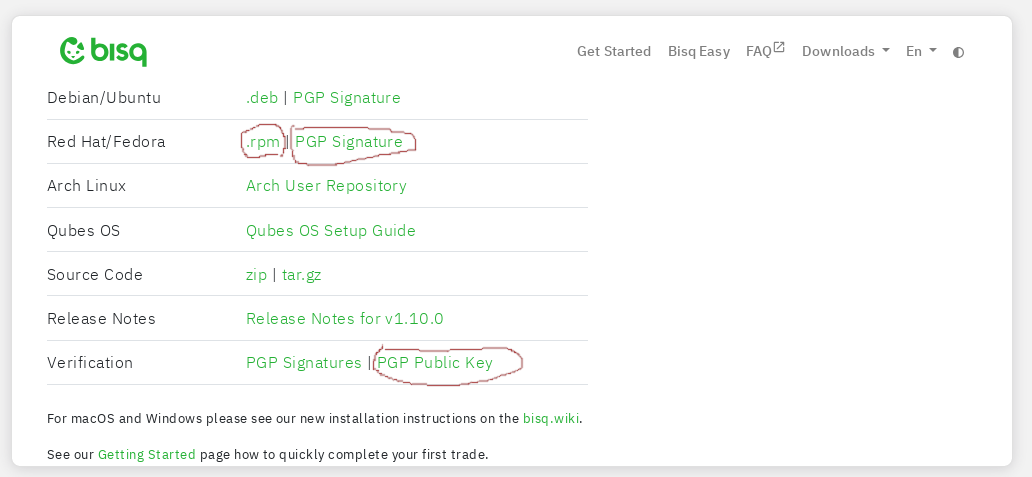
What is boilingfrog@gmx.com? DuckDuckGo search assist said this:
The boiling frog story is a metaphor about gradual change, suggesting that people may not notice or react to slow, harmful changes, just as a frog might not jump out of slowly heating water.
Weird. I just want to know how to check the file. Can someone please give me specific steps to correctly verify the new version?